
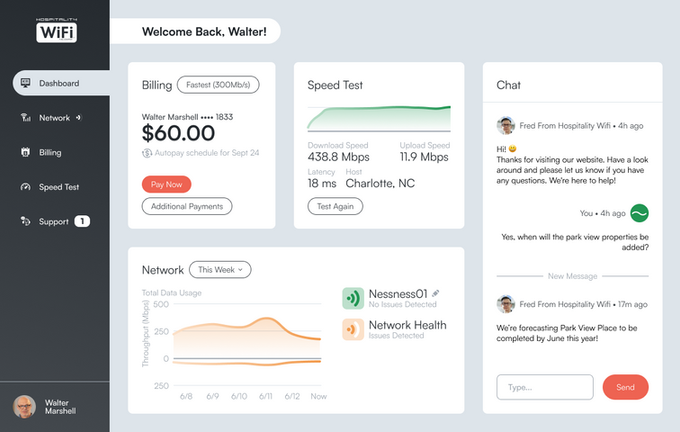
Hospitality WiFi Customer Dashboard
Designing a customer dashboard that helps hotel guests manage their internet service
Themes
Enterprise UX, Dashboard Design, Data Visualization, Information Architecture
Team
Myself, Chief Technology Officer, and Backend Developer
Tools
Figma
Timeline
4 Months
INTRO
A Dashboard Designed for Hotel Guests with Very Different Levels of Technical Comfort
Hospitality WiFi provides internet service to hotels and resorts, but guests often lack visibility into their connection, billing status, or available support.
I designed a customer dashboard that allows hotel guests to monitor their connection, manage billing, and troubleshoot network issues from a single interface.
The dashboard needed to support several key tasks:
-
Managing billing and payments
-
Monitoring network status and data usage
-
Running connection speed tests
-
Quickly contacting support
These features were designed to reduce support calls and give guests more control over their internet experience.
DESIGN CHALLENGE
How Might Me Build a Dashboard That Works For Both Technical and Non-Technical Users?
Hotel guests vary widely in their comfort with technology. Some users expect detailed network information, while others become frustrated by even simple digital interfaces. This raised an important design question:
How might we build a powerful dashboard for guests to fully control their internet experience without overwhelming them?
The solution required balancing clarity, accessibility, and functionality.
COMPETITIVE ANALYSIS INSIGHTS
Understanding What Internet Service Dashboards Already Offer Users
Because Hospitality WiFi serves hotel guests with a wide range of technical experience, I began by studying existing internet service dashboards to understand what features users expect when managing their network service.
Across product managers, engineers, analysts, and executives, users needed:
Billing & Payments
Users expected the ability to manage their account finances directly from the dashboard. Common functionality included:
Making initial and additional payments
Enabling autopay
Viewing billing history
Managing payment methods
Network Status
Users frequently needed quick visibility into their connection status. Typical functionality included:
Monitoring connection status
Viewing data usage
Restarting a modem or router
Speed Test
Many dashboards included a built-in tool for measuring connection performance.
This allowed users to quickly verify whether slow internet speeds were caused by the network or their own device.
Account Identifier
Several dashboards included a simple visual indicator confirming that the user was logged into their account.
This small feature helped reduce confusion and reassured users they were managing the correct account.
Support Access
Almost every dashboard provided a direct way to contact support.
This allowed users to quickly resolve connectivity issues without needing to navigate multiple support pages.
These findings helped define the core capabilities the Hospitality WiFi dashboard needed to support: managing billing, monitoring network status, and quickly accessing support.
USER RESEARCH
Understanding the Wide Range of Hotel Guests Using Hospitality WiFi
Hotel guests represent a diverse set of users with very different expectations and levels of technical comfort. Some rely heavily on stable internet connections for work or entertainment, while others may struggle with even basic technology.
Through research and stakeholder conversations, several user patterns emerged. These insights helped identify the different types of guests who would rely on the dashboard and informed the design decisions that followed.
The goal was to create a system that works equally well for power users who want control and visibility, and for guests who simply want their internet to work without friction.
PERSONAS
Designing for Travelers With Different Levels of Technical Confidence
From the research, several representative user personas were created to guide the design of the dashboard. These personas highlight the wide spectrum of expectations and frustrations guests may have when interacting with internet services.

Tony
The Traveling Worker
Tony frequently travels for business and depends on reliable internet access for remote work.
Needs
-
Stable connection
-
Clear network status
-
Quick troubleshooting tools

Jane
The Gamer
Jane uses hotel internet for high-bandwidth activities such as gaming and streaming.
Needs
-
Performance transparency
-
Speed testing
-
Connection diagnostics

Frank
The Everyday User
Frank uses hotel WiFi casually for browsing, streaming, and messaging.
Needs
-
Simple account overview
-
Easy payment management
-
Clear connection status

Samantha
The Hotel Manager
Samantha represents hotel staff who also rely on the system for troubleshooting guest connectivity issues.
Needs
-
Reliable service
-
Quick problem resolution
-
Clear system feedback

Walter
The Reluctant User
Walter has little patience for technology and becomes frustrated when interfaces feel complicated.
Needs
-
Simple interface
-
Clear messaging
-
Minimal steps to solve problems
USER RESEARCH
Translating User Research Into Product Problems to Solve
Research revealed that hotel guests have very different levels of technical comfort, from experienced remote workers to guests who struggle with basic technology.
This created a key design challenge: building a dashboard that provides powerful network management tools while remaining simple and approachable for less technical users.
From the research and competitive analysis, several core usability challenges emerged that the Hospitality WiFi dashboard needed to address.
Account Visibility
Guests needed a quick way to understand their account status immediately after logging in.
Many users simply want to know:
-
Is my internet working?
-
What is my current billing status?
-
Am I connected to the correct network?
Without a clear overview, users could quickly become confused about their connection or account status.
Billing Transparency
Users needed a clear and simple way to manage payments.
Competitive research showed that billing functionality is one of the most commonly used features in internet service dashboards.
Guests needed the ability to:
-
Make additional payments
-
Enable autopay
-
View billing history
-
Manage payment methods
This functionality needed to be easy to access without overwhelming users with financial details.
Network Visibility
Guests needed better insight into the performance of their internet connection.
Without clear indicators of network status and data usage, it can be difficult for users to understand whether connection issues are caused by the network or by their own device.
Providing transparent network feedback was essential to reducing frustration.
Quick Access to Support
When internet connectivity issues occur, guests often want immediate assistance.
Many existing systems buried support options within help pages or menus, making it difficult to quickly contact support staff.
The dashboard needed a clear and immediate path for users to request help when problems occur.
SOLUTION
Designing a Dashboard That Gives Guests Clarity, Control, and Support
To address the challenges identified during research, the Hospitality WiFi dashboard was designed around three key principles:
-
Immediate account visibility
-
Simple network management tools
-
Fast access to help when issues occur
The interface prioritizes clarity and simplicity so that both technical and non-technical guests can quickly understand and manage their internet service.
ADDRESSING THE DESIGN CHALLENGES
Clear Account Overview
The dashboard provides a quick overview of key account information immediately after login. Users can instantly see:
-
Immediate account visibility
-
Simple network management tools
-
Fast access to help when issues occur
This helps users quickly understand the state of their internet service without navigating multiple pages.

Billing and Payment Management
Guests can easily manage their billing directly from the dashboard. The interface allows users to:
-
View billing history
-
Make additional payments
-
Enable autopay
-
Manage payment methods
By keeping billing tools accessible from the main dashboard, users can resolve payment issues quickly.

Network Status and Speed Monitoring
To help users understand their connection performance, the dashboard includes tools for monitoring network status and running speed tests.
These tools allow guests to quickly determine whether connectivity issues are related to their device or the network itself.

Fast Access to Support
When connectivity problems occur, users can quickly connect with support staff directly from the dashboard.
Providing immediate access to help reduces frustration and helps resolve issues more efficiently.

ADDITIONAL FEATURES
Onboarding
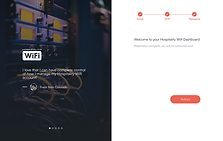
New users are guided through a short onboarding process that introduces the dashboard and its key capabilities.
This helps guests quickly understand how to manage their internet service without needing technical knowledge.




Dark Mode
The dashboard includes a dark mode option to improve readability and reduce eye strain, especially for guests accessing the system in low-light environments.


OUTCOME & IMPACT
A Clearer and More Accessible Way for Guests to Manage Their Internet Service
The Hospitality WiFi Customer Dashboard provides hotel guests with a simple and centralized way to monitor and manage their internet service.
By bringing billing management, network monitoring, and support access into one interface, the dashboard reduces friction and helps guests quickly understand the status of their connection.
The final dashboard consolidates billing, network monitoring, and support tools into a single interface, making it easier for guests to understand and manage their internet service.
“The Hospitality WiFi Customer Dashboard is an excellent tool that allows hotel guests to easily manage and monitor their wireless internet network.”
- Jeff Pennett, Hospitality WiFi Chief Technology Officer
REFLECTION
What I Learned
This project reinforced the importance of designing system dashboards that balance technical functionality with clarity for non-technical users.
Hotel guests ranged from power users who wanted detailed network insight to users who felt uncomfortable navigating digital tools. Creating a dashboard that served both groups required careful prioritization of information hierarchy and simplicity.
It also highlighted how product dashboards must balance technical functionality with clarity, ensuring users can quickly understand important information without feeling overwhelmed.
Feedback on the project? Want to discuss the tagging system further? You can find me on LinkedIn.